This website's main goal is to help and inform those who wish to start making video games. The above links go through
the starting steps for making a video game and what is needed to begin the process. There are also tips to for what to
look out for in terms of errors and problems outside of the coding.
This site was made by a passionate game coder who wishs to help those who want to create games of their own find their
footing. Any and all assistance in improving the site is appreciated. If you wish to reach out to give help or suggestions
to help the site grow, please email at: burkhartl849@macomb.edu to send help
so the site can grow or click the contact button below for more information.
Always Start with the Concept
The best place to start the process of making a video game is making the story for the
game. Jumping in immediately to the coding with no clue what your game would have in it
would lead to you stumping yourself in what to do next. Creating a concept for a game's
story first allows for knowledge of what to make when you get to coding the game you make.
You should not code a horse into your game if you don't know if you're going to need it.
Making the game concept will require some inspiration. Once inspiration strikes, you will
need to finalize details before starting the coding process. Inspiration for your game can
come from anywhere and come anyway it wants. Once you are inspired and have a proper story
it is time to create the code.
Starting the Actual Coding
Once you have made the concept for your game of choice, it is time to start making the code
for the game. Having a concept ready allows you to know what you need for the game you're making.
For example, if you have a horse in your game, you know you need a horse sound effect like:
Knowing what is needed ahead of time will make getting any assets easier to locate. When the
coding starts and everything is ready, you will need to first figure out what coding language
to use for making the game. There are multiple different coding languages and each are different
in how the code works and how the code is set up. You will also need to understand how to code in
the language you choose. Never start coding in a coding language you don't know anything about.
Below is a video about some of the starting basics for game coding.
What to Look for While Coding
There are always going to be problems with the code you make when you start.
When presented with an error in your code, check and double check the code
for:
Spelling errors
Incorrect code elements
Improper values being used
General errors like spelling in text or incorrect math
Errors can pop up at any time in the coding process and preventing errors requires
coders to pay attention to the code they make. If an error goes unnoticed and ends
up being a problem later, it could be a while until it is found. Once the process is
started and you have a understanding on what to do, coding the rest, which will take
time, will be easier as your project continues. It is also a good idea to remember how
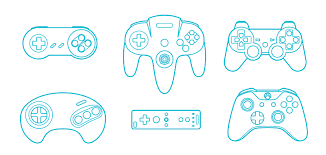
many different types of controllers and control schemes there are for different game types.
Different Game Controllers
Contact
Elements
Text
This is bold and this is strong. This is italic and this is emphasized.
This is superscript text and this is subscript text.
This is underlined and this is code: for (;;) { ... }. Finally, this is a link.
Heading Level 2
Heading Level 3
Heading Level 4
Heading Level 5
Heading Level 6
Blockquote
Fringilla nisl. Donec accumsan interdum nisi, quis tincidunt felis sagittis eget tempus euismod. Vestibulum ante ipsum primis in faucibus vestibulum. Blandit adipiscing eu felis iaculis volutpat ac adipiscing accumsan faucibus. Vestibulum ante ipsum primis in faucibus lorem ipsum dolor sit amet nullam adipiscing eu felis.
Preformatted
i = 0;

while (!deck.isInOrder()) {
    print 'Iteration ' + i;
    deck.shuffle();
    i++;
}

print 'It took ' + i + ' iterations to sort the deck.';